

Table Of Content
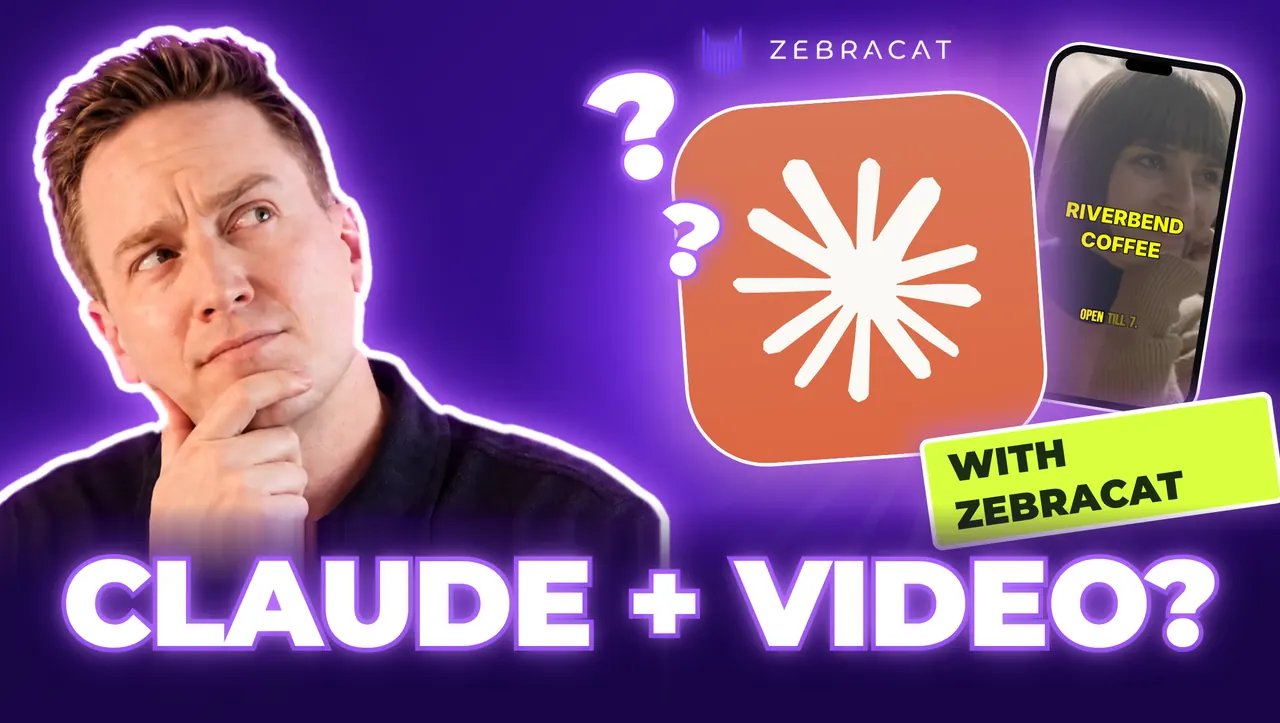
Claude can't film anything, but it can get you a finished, ready-to-post video in minutes. We use Claude every day at Zebracat to make videos and grow social channels to millions of views, and more than 50,000 users have made over 2 million videos with Zebracat. Here's what Claude can really do with video on each plan, and the fastest way to get a finished Reel out of it.
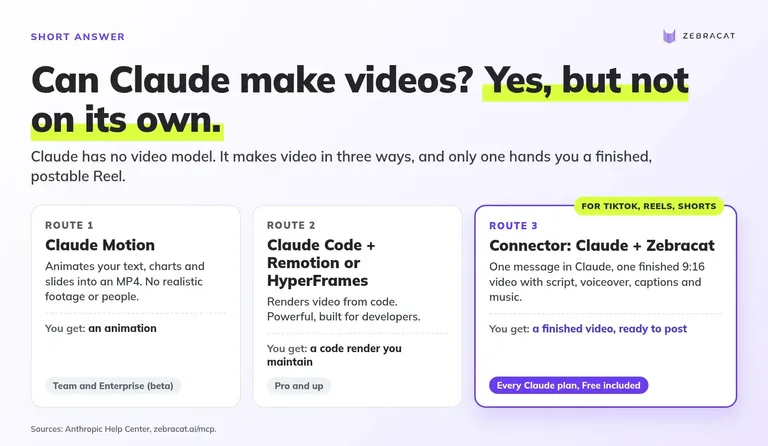
Short answer: Yes, but Claude has no video model of its own. It makes video three ways: Claude Motion animates text and data (Team and Enterprise plans), Claude Code renders video from code with Remotion or HyperFrames, and connectors hand the job to a video tool. For a finished, voiced, captioned TikTok or Reel, use a finished-video connector.
Key takeaways
- Claude cannot generate video by itself. Every route either animates code or calls another tool.
- Claude Motion turns your text, charts and slides into animated MP4s, but only on Team and Enterprise plans, and it does not make realistic footage or people.
- Clip connectors (Higgsfield, OpenArt, CreativeClaw) return single shots of a few seconds. You still write the script, add voice and captions, and edit.
- Finished-video connectors (Zebracat, Fliki, Autoclips) return a complete short video with voiceover, captions and music.
- Zebracat picks the AI model per scene for you (Veo 3.1, Kling 3.0, Seedance 2.5, MiniMax and others), so you do not pay top-model credits for every shot. It can then help you find ideas and post the result. That is the difference between a clip and a growth system.
- Our own test: one idea in, a finished vertical MP4 with voiceover in about 2 minutes, at 0 AI credits on stock footage. Details below.
Can Claude make videos on its own?
No. Claude is a language model. It writes, reasons and codes, but Anthropic has not shipped a model that generates video pixels. When people say "Claude made this video," one of three things happened:
- Claude Motion (and animated artifacts). Claude writes code that animates your text, charts, shapes and images, and you download it as an MP4. Anthropic announced Motion on 8 October 2026 (Anthropic), in beta on Team and Enterprise plans. In Anthropic's words: "Claude Motion doesn't use a video generation model, so it doesn't create realistic footage or people" (Claude Help Center). Artifacts exist on every plan, but Anthropic documents MP4 export only for the Motion template (artifacts).
- Code that renders video. In Claude Code, Claude writes a React or HTML composition and a framework like Remotion or HyperFrames renders it to MP4. Powerful, repeatable, and built for developers.
- Connectors (MCP). Claude calls an outside video tool through the Model Context Protocol, the open standard Claude uses to talk to other apps. The tool does the generation and Claude does the briefing. Anthropic reports MCP passed 400 million monthly SDK downloads (Anthropic, July 2026).
The third route is where people who want social videos end up, and where the key split happens.
Definition: clip vs. finished video. A clip is one generated shot, usually 5 to 15 seconds, often silent. A finished video is ready to post: a script, several scenes, a voiceover, captions, music and the right aspect ratio (9:16 for TikTok, Reels and Shorts).
This confuses almost everyone. An r/ClaudeAI thread asking how people make "those insane graphic motion videos" with Claude drew 800+ upvotes, and the replies show three walls:
- The plan wall: "So I can't do this with my max 20x plan? I need to get api key?" (u/Hungry-Ad2176)
- The format wall: "claude can't output video files" (u/FranticallyWorldly)
- The time wall: "Mine takes around 1 hour for a 1-2 min video." (u/nyamuk91)
And the people who want social content say it plainly: "I want to use only Claude in making faceless reels" (u/Living-Feeling7906). The next section is that route.
How do I get a finished TikTok, Reel or Short out of Claude?
Connect a finished-video tool to Claude, describe the video in plain words, approve the price, and download or post the result. With Zebracat it takes three steps and no API key.
Step 1: Connect Zebracat to Claude (about a minute)
- In Claude, open Customize > Connectors and choose Add custom connector.
- Paste
https://mcp.zebracat.ai/mcp. - Sign in with your Zebracat account when prompted. No separate key or plan: usage comes from your normal Zebracat credits (Zebracat MCP).
In Claude Code it is one line: claude mcp add --transport http zebracat https://mcp.zebracat.ai/mcp/ (mcp.zebracat.ai).
This works on every Claude plan. Free accounts can add one custom connector; on Team and Enterprise, an Owner adds it for the organization and each person then connects their own account (Claude Help Center).
Step 2: Brief it like you would brief an editor
You can start from an idea, a script, a link to a blog post or page, or an audio file (Zebracat MCP). Specific briefs win. Copy this one:
Make a 30-second vertical video for TikTok and Reels with Zebracat.
Topic: [your topic]
Audience: [who it is for]
Hook in the first 2 seconds: [the claim or question]
Voice: [e.g. warm female, US English]
Style: [e.g. cinematic, bold captions]
End with: [call to action]
Ask me anything you need before you start, and show the price first.
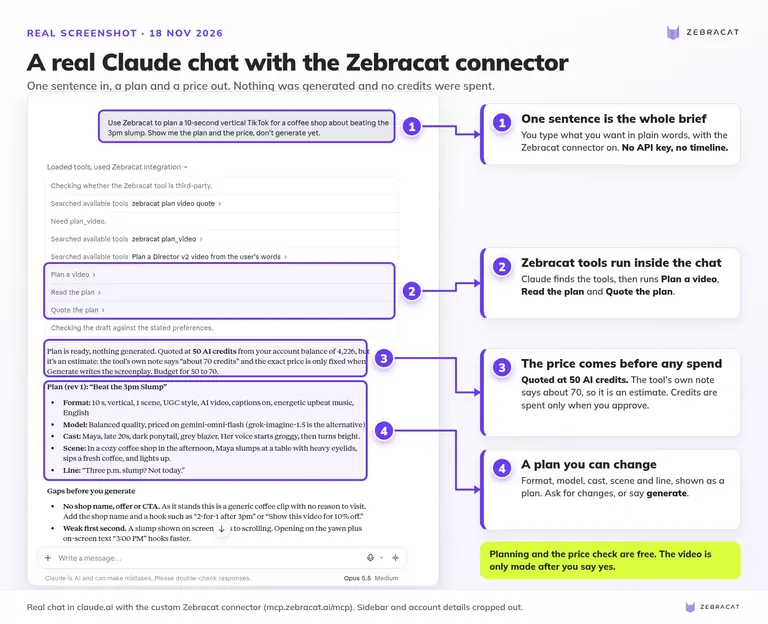
In the chat, your agent plans the script, visuals, voiceover and music, shows you the price, and generates only when you approve (Zebracat MCP). Planning and the price check are free (MCP docs). In our real chat below, the quote showed 50 AI credits, an estimate until the video is generated. You can change the hook, voice or length in one message before you spend anything.
Step 3: Review, fix, post
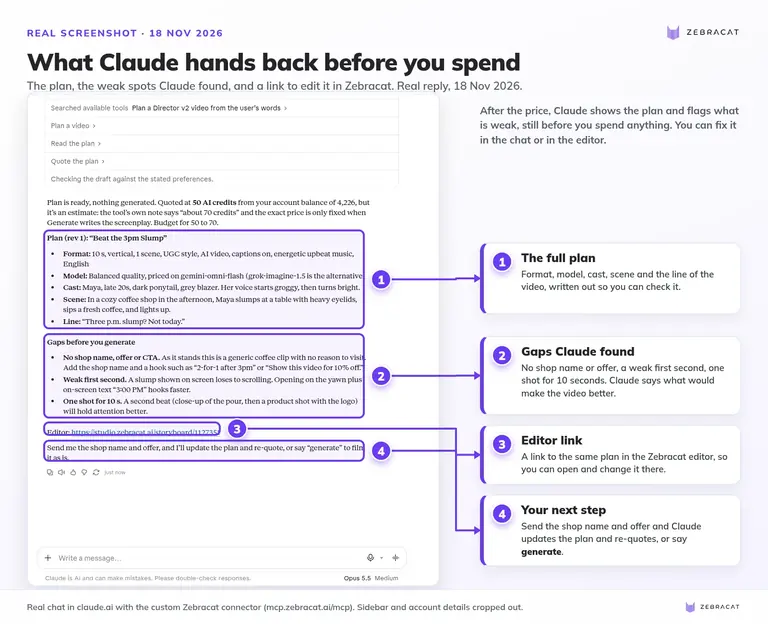
Zebracat returns a hosted link and an MP4 download (Zebracat MCP FAQ). Your brand kit and cloned voices are available to agent calls, so the video can already carry your logo, fonts and voice. Want to change one scene? Open the video in the editor, swap the model for that scene, regenerate it, and keep the rest (AI video models).
We ran it: one real test
I tested this myself instead of describing it. The brief was one line: a 10-second video about the afternoon slump in a coffee shop.
- Result: a vertical 9:16 MP4 called "Your 3pm Slump", 720x1280, 2 scenes of stock footage with English voiceover.
- Time: about 2 minutes from the moment I approved the price to a finished MP4. The plan itself took under 10 seconds.
- Cost: one video from the plan, with no extra AI credits, because the scenes used stock footage.
Try it on your own topic. One message in Claude, one finished vertical video back. Add Zebracat to Claude →
Why not just use a clip connector inside Claude?
Because a clip is a part, not a product. With a clip connector you choose a model for every shot, compare credit prices, generate several shots, and still need a script, voice, captions, music and an edit.
Zebracat picks the model for you. It has the current top models on one credit balance: Veo 3.1, Kling 3.0, Seedance 2.5 and MiniMax for video, Nano Banana for images, and AI voices in 170+ languages. It "picks the right model per scene" and "routes it to the model that gives the best quality for the fewest credits." You can override any scene, "but you never have to" (AI video models). The pricing page says the same: the best model is picked for every scene, and every new top model is added as soon as it launches (pricing).
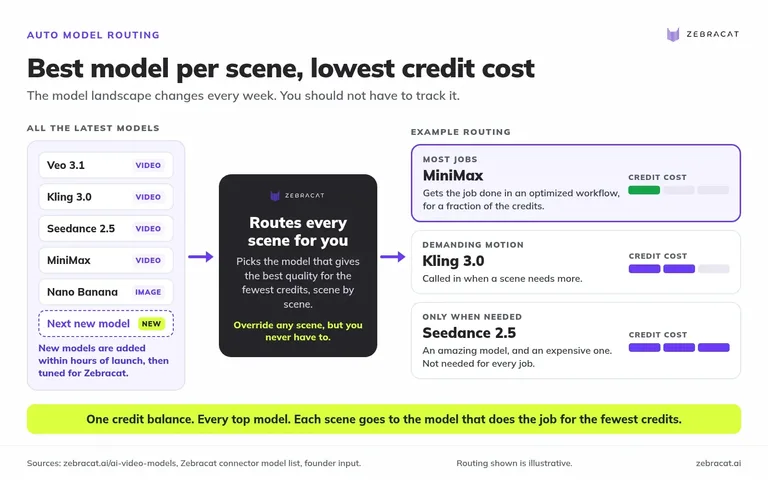
Why does routing matter? The model landscape changes every week. Zebracat is connected to all the major model providers, and we add new models within hours of launch and optimize them. Seedance 2.5 is amazing, but it is extremely expensive and you do not need it for every job. Often MiniMax does the job as well inside our optimized workflow, for a fraction of the credits. That's my view from running the product every day.
And it finishes the job. Script, scenes, voice, captions, music and format come back as one video. Images, voiceovers, scripts, posting and video ideas use no credits; credits are only for animating scenes with AI video models (pricing).
| Job | Clip connector | Zebracat (finished video) |
|---|---|---|
| Pick a model per shot | You do it | Done per scene, override optional |
| Compare credit costs | You do it | Routed to best quality for fewest credits |
| Script and hook | You write it | Generated, editable |
| Voiceover | Separate tool | Included, 170+ languages or your cloned voice |
| Captions and music | Separate editor | Included |
| 9:16 for TikTok, Reels, Shorts | Per clip, then edit | Native |
| Post to social | Download and upload | Content Calendar on paid plans |
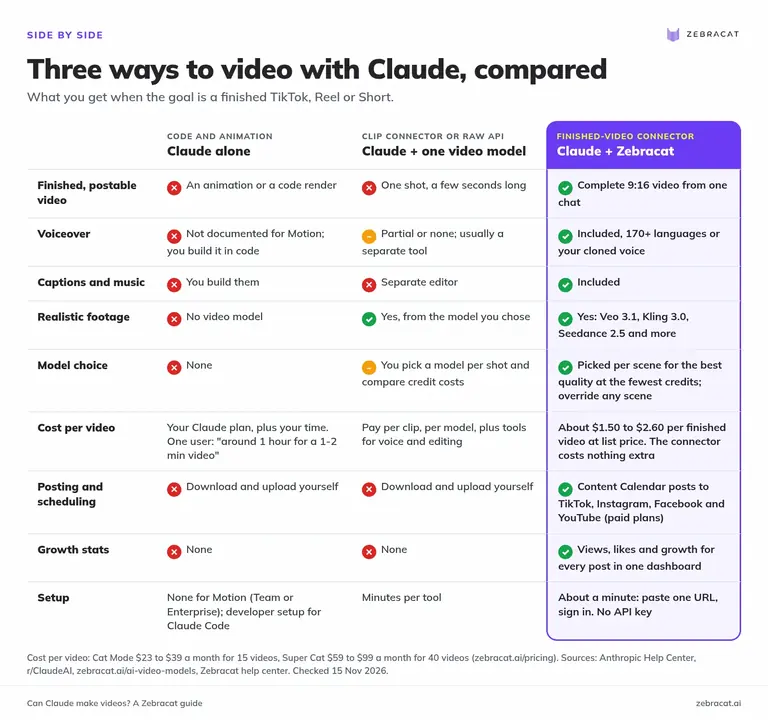
Which way should you make videos with Claude?
Pick the route by what you want at the end, not by the tool. Use this table and the flowchart below.
We build Zebracat, so we also show where it's not the best fit.
| Route | What you get | Claude plan needed | Voice and captions | Realistic footage | Setup | Best for |
|---|---|---|---|---|---|---|
| Claude Motion | Animated text, charts, shapes, images as MP4 | Team or Enterprise (beta) | Not documented | No (no video model) | None | Data explainers, internal updates |
| Animated artifacts | Simple animations in the chat (no documented MP4 export) | All plans, including Free | No | No | None | Quick motion mockups |
| Claude Code + Remotion or HyperFrames | Code-rendered MP4, fully controllable | Pro and up | You build it | Only with your own assets | Developer setup | Templated, repeatable renders |
| Clip connectors (Higgsfield, OpenArt, CreativeClaw) | One generated shot, seconds long | All plans (Free: one connector) | Partial or none | Yes | Minutes | Single cinematic shots, hand-picked model |
| Finished-video connectors (Zebracat, Fliki, Autoclips) | Complete short video with voice, captions, music | All plans (Free: one connector) | Yes | Yes (via video models) | About a minute | TikToks, Reels, Shorts, ads |
Rows are based on each tool's own documentation, as of November 2026.
Finished-video connectors differ in what surrounds the video. Fliki's own Claude tutorial says its integration needs the Premium or Enterprise plan. Autoclips can post to social accounts but does not name its video models in its Claude guide. Zebracat names its models, routes them per scene, and adds idea discovery and scheduling.
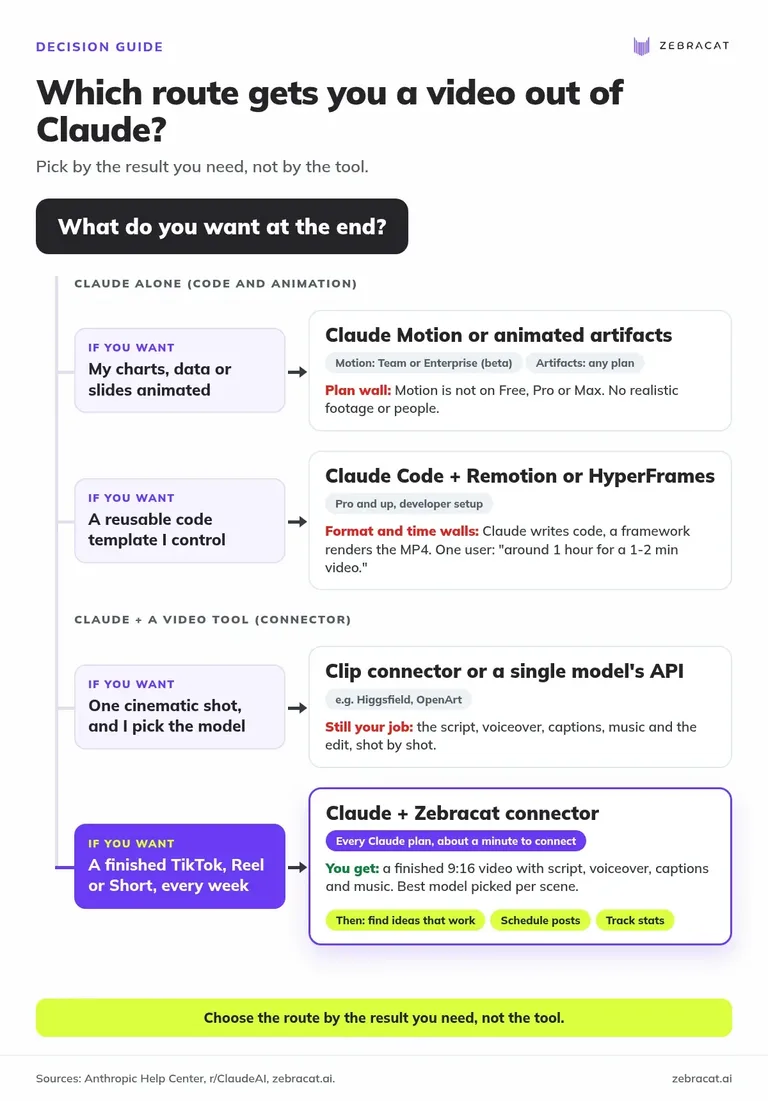
Want the last row? If your goal is a finished TikTok, Reel or Short every week, that is what Zebracat is built for. Add Zebracat to Claude →
What can each Claude plan do with video?
Every Claude plan can make some kind of video. Only Team and Enterprise get Claude Motion, and only paid plans get Claude Code. Custom connectors, the route to finished videos, work on every plan, including Free.
| Plan | Artifacts | Claude Motion | Claude Code | Connectors |
|---|---|---|---|---|
| Free$0 | Yes | No | No | Yes, one connector |
| Pro$20/mo, $17 billed yearly | Yes | No | Yes | Yes |
| Max$100/mo | Yes | No | Yes | Yes |
| Ultra$200/mo | Yes | No | Yes | Yes |
| TeamStandard $25/seat, $20 billed yearly; Premium $125, $100 yearly | Yes | Yes, beta, on by default | Yes | Yes, added by an Owner |
| Enterprise$20/seat/month billed yearly, 20 seats minimum, plus usage | Yes | Yes, beta, an Owner must turn it on | Yes | Yes, added by an Owner or permitted role |
Artifacts: no MP4 export. Claude Code: Remotion, HyperFrames. Connectors: Zebracat, clip tools. Prices as of Nov 2026.
Sources: Claude pricing, artifacts, Claude Motion, Motion admin settings, Claude Code availability, custom connectors.
Pro and up also get Claude Data, which can produce "narrated short videos" from company data (Claude Data). It is built for internal data stories, not social content.
What this means for you: on Free or Pro, a connector is your route to social videos. You do not need to upgrade Claude to get a finished Reel.
Can Claude edit videos?
Not directly. Claude cannot open your MP4 and cut it. Anthropic's supported upload formats are documents and images, and the API treats animated images as their first frame only (vision docs, file uploads).
What works instead:
- Edit by code. In Claude Code, Claude can run tools like FFmpeg, Remotion or HyperFrames to trim, caption and assemble files on your machine. It is behind most "I edited a video with Claude" demos, and it assumes you are at home in a terminal.
- Edit in the tool. A video made through Zebracat opens in the Zebracat editor, where you change text, visuals, voice or music, regenerate any single scene with a different model, and export (AI video models, Zebracat MCP).
- Plan the edit. Claude is strong at hooks, cut lists, captions, titles and hashtags. We covered that side for ChatGPT in Can ChatGPT edit videos?
If you filmed the footage yourself, use a timeline editor. That is not what Zebracat or Claude is for.
Is a video the goal, or growth?
For most creators and marketers, one video is not the goal. Views, followers and customers are. And the shift to AI is already mainstream: 63% of video marketers have used AI to create video, up from 51% a year earlier (Wyzowl, State of Video Marketing 2026). More numbers in our AI video creation statistics. A video that took an afternoon and gets posted once is a cost. A steady stream of videos built on formats that already work is a channel.
That is why we built the Claude connector. We were missing a way to do more than create videos. We wanted to figure out which videos work, then post and schedule them, so we built a growth system for social media videos made with AI. Customers often get hundreds of thousands and even millions of views, and they have a dashboard with stats where they see their channels grow. Here is the loop:
- Find what works. The Inspiration page (beta) lets you search viral videos in your niche, filter by keywords and time window, and sort by most popular, trending or newest (help center).
- Turn it into ideas. Pick a video and Zebracat pulls out its script and visual style, so you keep the structure that performed and swap in your message, voice and brand. The pricing page lists "Remix viral videos in your niche" on every paid plan.
- Create. Idea, script, link or audio in, finished video out, with the model chosen per scene. You can also translate and re-voice a finished video (Zebracat MCP).
- Post. The Content Calendar schedules or auto-posts to TikTok, Instagram, Facebook and YouTube, and AI can draft the caption, title and hashtags. Turn on "Auto add to queue" and new videos post once they render. Connecting accounts is free; publishing is part of the paid plans (help center).
- Track. Post stats show views, likes and growth for every post in one dashboard, and what works feeds your next idea (zebracat.ai).
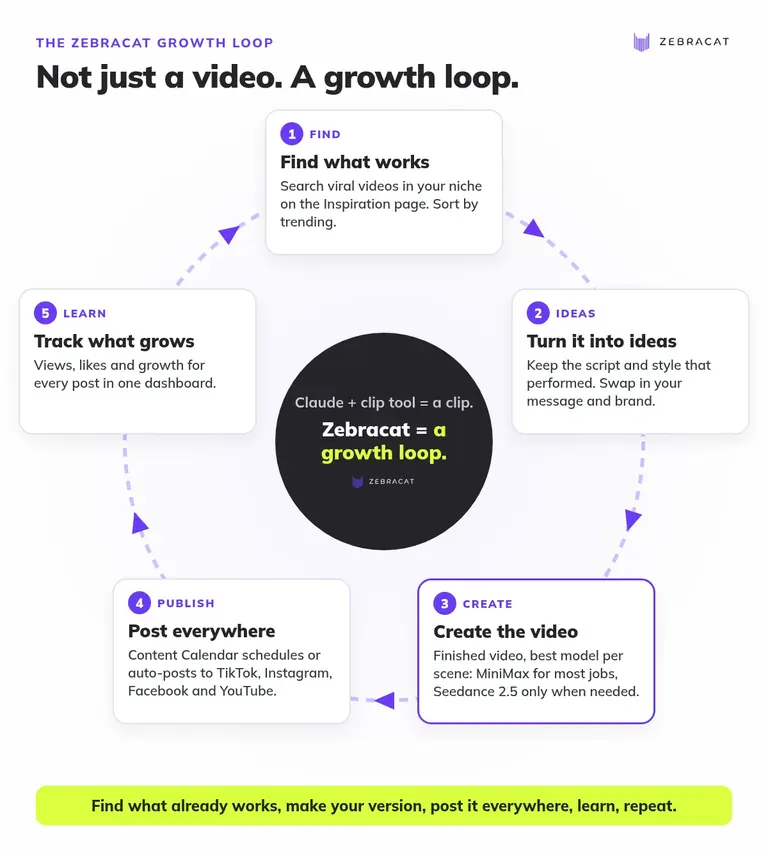
From a Claude chat, most of this loop works through the connector. The MCP docs list tools to search viral TikToks and Shorts by keyword or niche (search_inspiration), read a video's words (get_inspiration_transcript), remake a video in your style (clone_video, paid plans, with a quote first), translate and re-voice a video (translate_video) and post or schedule it to your connected accounts (schedule_post, after you say yes) (MCP docs). Example prompts from the docs: "What's going viral about skincare right now?", "Make one like the second video.", "Post it to my TikTok tomorrow at 9." Stats are not an MCP tool, so the Track step lives in the Zebracat app.
What does it cost, and is it worth it?
Four honest answers to the four questions buyers ask us.
"What does a video actually cost?" Cat Mode is $39 a month, or $23 a month billed yearly, for 15 videos a month and 350 AI animation credits. Super Cat is $99, or $59 yearly, for 40 videos and 1,400 credits (pricing). At list price that is about $1.50 to $2.60 per finished video, and the connector costs nothing extra. Compare one agency owner building with Claude Code: "I pay an editor about $1,500/month to edit all my videos" (r/ClaudeCode).
"Is the quality good enough to post?" The video scenes come from the same frontier models people pay for separately: Veo 3.1, Kling 3.0, Seedance 2.5, plus MiniMax for jobs that do not need a top-tier model. Zebracat is rated 4.8 across review platforms (Google Reviews, Trustpilot, G2). Here is what customers say:
"Of all the AI video generators I have seen, this one is the best quality" (Tran Nguyen on Trustpilot)
"I've been using it for 3 weeks, testing 3-4 videos per day. This saves a lot of time, gets results, and costs way less than hiring creators." Yasemin F., Social Media Marketer, on zebracat.ai
"I know (and used) a lot of AI video tools (for different usecases). Also direct competitors. Zebracat is the only one that gives great results very fast - also the caption styles are great!" Robert Leitinger, CodeRocker - Online Marketing Agency, on zebracat.ai
"How long is setup?" About a minute: paste one URL, sign in. No API key, no Claude Code, no render server.
"Isn't this just another wrapper?" A wrapper passes your prompt to one model. Zebracat writes the script, splits it into scenes, picks a model per scene for quality and cost, adds voice, captions and music, applies your brand kit, and can then schedule the result and track how it performs. If all you need is one eight-second shot, a clip tool is the simpler choice.
Free vs paid, plainly: in Claude, planning a video and seeing the price costs nothing, and credits are spent only when you approve (Zebracat MCP). That lets you judge the plan before you pay. Social publishing, watermark-free 1080p exports, monthly animation credits and remixing viral videos in your niche come with the paid plans. If you post every week, paid is the version that saves you hours.
Where Zebracat is not the best choice
- Animating your own charts and data inside Claude: Claude Motion is built for that.
- Pixel-level control and code templates: Claude Code with Remotion or HyperFrames.
- A single cinematic shot where you want to hand-pick the model: a clip connector like Higgsfield.
- Editing footage you filmed yourself: a timeline editor such as CapCut.
- Long videos: Zebracat is built for short vertical videos for TikTok, Reels and Shorts. Length depends on your plan (up to 10 minutes on Unlimited Cat), and Cat Mode includes 15 videos a month, so a large library needs a bigger plan.
How we tested
Every Claude claim is checked against Anthropic's own help center, pricing and docs. Zebracat facts come straight from our product and live pricing. Facts about other video tools come from each tool's own Claude guide. We built Zebracat's Claude connector and use it every day to make videos and grow social channels, and for this article we ran the full flow end to end: one brief in Claude, a priced plan, then a finished, voiced vertical MP4.
FAQ
Can Claude generate video?
Not with its own model. Claude animates by writing code (Claude Motion, artifacts, Claude Code with Remotion or HyperFrames) or calls a video tool through a connector. Realistic footage comes from a connected model such as Veo, Kling or Seedance.
Is Claude video generation free?
Partly. Artifacts (without MP4 export) and one custom connector are available on the Free plan. Claude Motion needs Team or Enterprise, and Claude Code needs Pro or higher. Connected tools bill their own credits: with Zebracat, planning a video and seeing the price in Claude is free, and credits are spent only when you approve.
Which tool makes finished TikToks or Reels from Claude?
Finished-video connectors: Zebracat, Fliki and Autoclips each return a complete short video with voiceover and captions. Zebracat also picks the AI model per scene, finds proven formats in your niche, and schedules posts to TikTok, Instagram, Facebook and YouTube.
Can Claude make realistic videos with people?
Not on its own. Anthropic says Claude Motion "doesn't create realistic footage or people." For realistic scenes or presenters, connect a tool that uses video models or AI avatars.
Do I need Claude Code or an API key to make videos with Claude?
No. Finished-video connectors run in the normal Claude app. Zebracat's connector needs only a sign-in with your Zebracat account.
Which AI models does Zebracat use, and how does it choose?
Zebracat offers Veo 3.1, Seedance 2.5, Kling 3.0, MiniMax and other models, and picks the model for each scene. Seedance 2.5 is very strong but costs far more credits, so Zebracat can send simpler scenes to a cheaper model such as MiniMax. You can override any scene.
How much does a Zebracat video cost?
Cat Mode is $39 a month ($23 billed yearly) for 15 videos and 350 AI animation credits, Super Cat is $99 ($59 yearly) for 40 videos and 1,400 credits. That is about $1.50 to $2.60 per video at list price. Voiceovers, images and scripts use no credits (pricing).
Is Claude or ChatGPT better for making videos?
Neither has a built-in video model you can prompt for a finished Reel in the chat. Use the assistant you already work in, plus the right video tool. Zebracat's connector works in Claude, Codex and Cursor, and in ChatGPT on Business, Enterprise and Edu workspaces (Zebracat MCP).
Make your next video from one message
You already think in Claude. Now let it hand you a finished video: script, scenes from the best model for each shot, voice, captions, music and your brand, ready for TikTok, Reels and Shorts. Then let Zebracat find your next idea and post it.
- Finished 9:16 video from one chat
- Veo 3.1, Seedance 2.5, Kling 3.0, MiniMax and more, picked per scene for quality and cost
- Find, create and post in one place
Add Zebracat to Claude →
Rated 4.8 · 50,000+ AI creators

Michael Baumgartner is CEO and co-founder of Zebracat and has been building AI video products since 2021. More than 50,000 creators have made over 2 million videos with Zebracat. He led the build of Zebracat's Claude connector, and he and his team use Claude every day to create videos and grow social channels to millions of views.
Create videos 10x faster and easier with Zebracat
Try it now
Comments