


Table Of Content
Most teams pick the wrong AI video API, and they don't find out until they've burned weeks wiring it in. The mistake is treating "AI video API" as one thing. It isn't.
An AI video generation API turns a text prompt, script, URL, or image into video through a single programmatic call, so you can build video creation into a product, an agent, or an automated pipeline instead of opening an editor. But that one label hides three completely different products. Some return an eight-second raw clip. Some return a talking avatar. A few return a finished, publish-ready video with voiceover, B-roll, music, and captions already assembled. Choose the wrong layer and you spend the next month building the other 90% yourself.
I've been building AI video products since 2021 and I run these APIs in production every day. So this is the field tested from the inside, not a feature-sheet roundup. Here is the short version:
- Best for finished, publish-ready videos from text or a URL: Zebracat
- Best raw cinematic quality (with native audio): Google Veo 3.1
- Best for realistic talking-avatar presenters: HeyGen
- Best for enterprise training and avatars: Synthesia
- Best for programmatic editing and mass personalization: Shotstack
- Best for creative and experimental generation: Runway Gen-4
- Best cheap, fast raw clips: Kling / MiniMax Hailuo
- Best direct rival for URL-to-UGC ads: Creatify
AI video generation API comparison (2026)
APILayerOutputInputsPricing modelFree tierPublic APIZebracatEnd-to-end creationFinished, edited video (voiceover, visuals, music, captions)Text, script, URL, audioPay-as-you-go from $10; per videoYes (trial)YesCreatifyEnd-to-end (avatar/UGC)Avatar + URL-to-video adsText, URL, product linkCredits; from ~$19/mo; Aurora on fal.ai ~$0.10-0.14/secLimitedYesHeyGenAvatar / presenterTalking-avatar videoText, image, videoSubscription; API from ~$99/moYes (basic)YesSynthesiaAvatar / presenterTalking-avatar videoText, templatesSubscription from ~$29/mo; API on higher tiersNo (paid)Higher tiersShotstackEditing / automationWhatever you compose (asset-agnostic)JSON timeline + assetsPay-as-you-go (~$0.20/rendered min)Yes (sandbox)YesRunway (Gen-4)Raw generative modelShort generated clipText, image, videoCredit-based; from ~$15/mo + API usageYes (limited)YesGoogle Veo 3.1Raw generative modelShort cinematic clip (+ audio)Text, imagePer second (~$0.15 Fast / ~$0.40 Standard; Lite ~$0.05)No (Cloud credits)Vertex/GeminiKling 3.0Raw generative modelShort clipText, imagePrepaid credit packagesYes (freemium)YesMiniMax Hailuo 2.3Raw generative modelShort clipText, imagePer second (~$0.04)LimitedYesOpenAI Sora 2Raw generative modelCinematic clip (+ audio)Textn/aNoNo (discontinued 2026)fal.ai / ReplicateAggregatorRaw clips (many models)Text, imagePer second, varies by modelLimitedYes
Pricing is approximate and as of mid-2026. Verify current rates on each provider's pricing page before committing; this market reprices constantly.
First, choose the right layer: the four types of AI video API
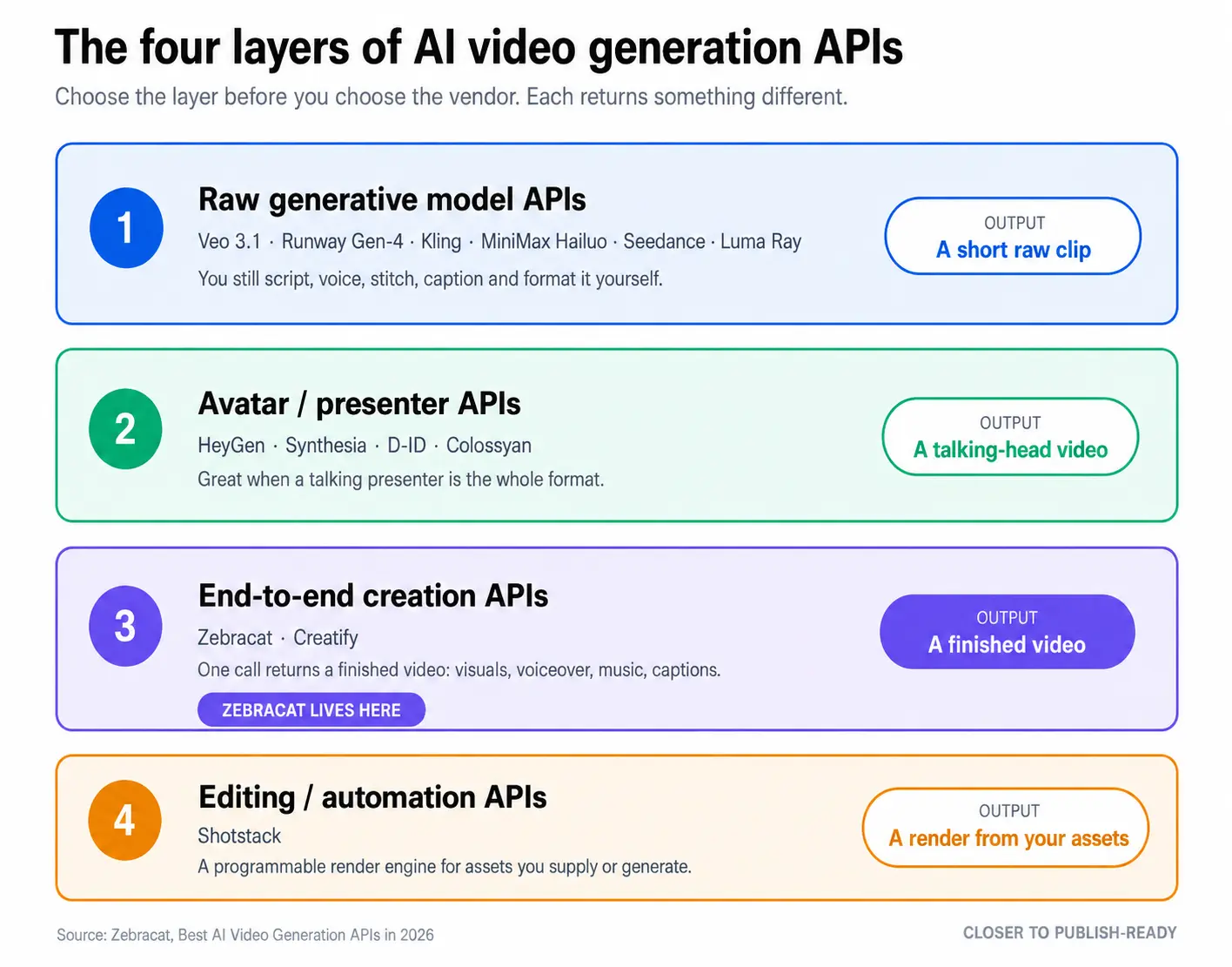
Most "best API" lists mix incompatible tools into one ranking. That is why they confuse buyers. There are really four layers, and you should pick the layer before you pick the vendor.
1. Raw generative model APIs. These generate video from a prompt or image: Google Veo 3.1, Runway Gen-4, Kling, MiniMax Hailuo, ByteDance Seedance, Luma Ray (OpenAI's Sora belonged here until its API was retired). You get a short clip (often 5-10 seconds) of generated footage. Brilliant for unique visuals and creative shots. But a clip is not a finished video. You still have to script it, add a voiceover, stitch multiple clips, add music, caption it, and format it per platform.
2. Avatar / presenter APIs. These turn a script into a person (real-looking or AI) delivering it to camera: HeyGen, Synthesia, D-ID, Colossyan. Ideal when a talking presenter is the format: training, explainers, spokesperson ads. The trade-off: output is a talking head on a simple background. No dynamic scenes, B-roll, or full editing.
3. End-to-end creation APIs. These take text, a script, or a URL and return a finished, edited video with scenes, voiceover, music, captions, and transitions all assembled: Zebracat and, in the UGC-ad niche, Creatify. This is what you want when the job is "give me a publishable video," not "give me raw material to edit."
4. Editing / automation APIs. These assemble assets you provide (or generate elsewhere) into a final render via a programmatic timeline: Shotstack. Maximum control, infinitely scalable, but you build the creative logic and supply the assets.
Quick rule: if you need footage, use Layer 1. If you need a presenter, use Layer 2. If you need a finished video, use Layer 3. If you need a render engine for assets you already have, use Layer 4. Many production stacks combine layers.
How we tested
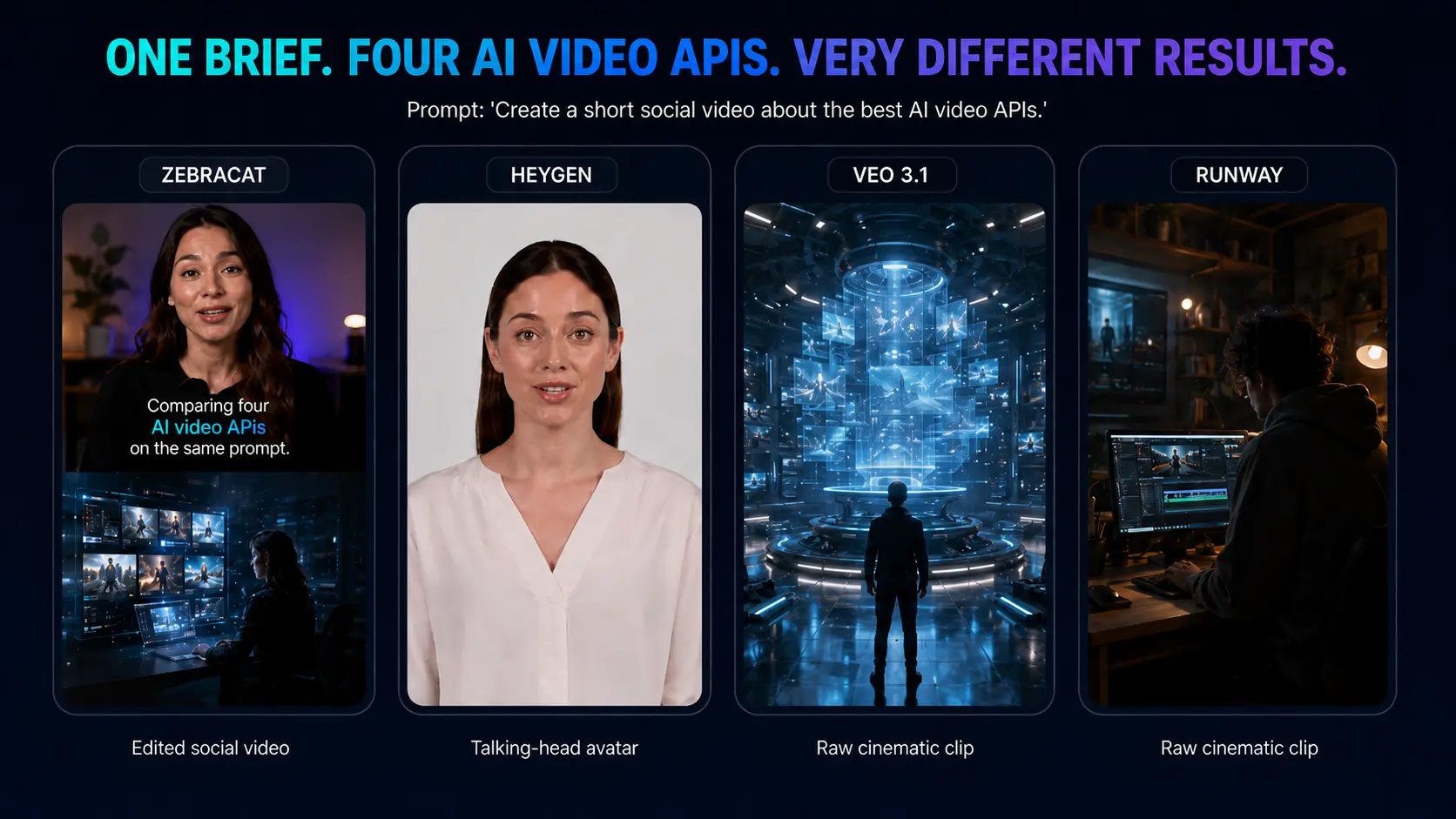
We evaluated these APIs the way a developer integrating one would, not the way a consumer clicking around a web app would. Each API was given the same brief and judged on what it took to get from input to something you could actually publish.
The brief: "Turn this 180-word product blog post into a 30-second vertical (9:16) social video with a voiceover, captions, on-brand colors, and background music." That is a realistic production task, not a cherry-picked cinematic prompt.
We scored each API on five dimensions:
- Output completeness: how close the result is to publish-ready versus raw material that still needs assembly.
- Time to finished video: wall-clock time from API call to a video you could post, including any stitching or editing steps you have to do yourself.
- Developer experience: docs quality, auth, async/webhook handling, SDKs, error messages, time to first successful render.
- Control and brand fit: resolution and aspect-ratio options, voice and style control, captions, logo and colors, templating.
- Cost to a finished video: not the headline per-second price, but the all-in cost to reach the deliverable above.
Where a model is gated or no longer offers a self-serve API (Sora, some Veo tiers), we tested what was accessible and relied on documented specs for the rest, and we say so. Pricing was checked against each vendor's live pricing page at time of writing.
The best AI video generation APIs in 2026
1. Zebracat: best for finished, publish-ready videos from text or a URL
Layer: End-to-end creation. Best for: marketing and social video at scale, URL-to-video product features, agent workflows.
Most APIs on this list hand you an ingredient. Zebracat hands you the finished dish. Send a script, a block of text, a blog URL, or an audio file to a single endpoint, and you get back a complete, edited MP4 with AI-selected visuals, voiceover, background music, transitions, and captions already assembled and formatted for the platform you target.
const response = await fetch("https://api.zebracat.ai/v1/generate", { method: "POST", headers: { "Authorization": "Bearer zc_live_...", "Content-Type": "application/json" }, body: JSON.stringify({ script: "Your AI-powered script", voice: "en-US-professional", style: "corporate", resolution: "1080p", webhook_url: "https://your.app/callback" })});const { video_id, status } = await response.json();
Three things make it genuinely different from everything else here:
It produces many video types, not one. Avatars, AI-animated scenes, faceless stock-and-B-roll edits, photo-realistic and stylized looks, captioned talking-head clips, product showcases. You are not locked into "avatars only" (like HeyGen or Synthesia) or "raw clips only" (like Veo or Kling). The Agentic Video API can even pick the optimal video type, visual style, voice, mood, and aspect ratio from a single prompt, or you can override any parameter.
It routes across the underlying models for you. Zebracat sits on top of the major AI image and video models and selects the best model for each shot, balancing quality against cost, instead of locking you to one engine. You get the benefit of the frontier models without integrating, benchmarking, and repricing each one yourself as the leaderboard changes month to month.
It goes beyond generation, end to end. The platform behind the API can analyze your website, niche, and what's trending to suggest a content strategy, generate the videos, schedule and publish them to social channels (the Scheduling API posts to Instagram and others with captions and hashtags), then learn from real performance to improve future videos. Most "video APIs" stop at the render. Zebracat closes the loop from idea to published to optimized.
The API surface reflects this: dedicated endpoints for Video Generation, Agentic generation, Video Translation (80+ languages, re-voiced audio and captions), Voice Cloning (reusable voice_id), AI Characters (persistent avatars), and Social Scheduling, plus Image Generation. It ships as a REST API, an MCP server for AI agents (Claude, Cursor, OpenAI), pre-built agent skills, and no-code connectors for Zapier, Make, and n8n. Full endpoint details and code samples live in the Zebracat API documentation. Output is MP4 at 720p, 1080p, or 4K in 16:9, 9:16, 1:1, and 4:5. Videos render in under two minutes and deliver via webhook.
Pros:
- Returns a finished, on-brand video, not raw material to edit
- Widest output variety on this list (avatars, scenes, B-roll, stylized, faceless)
- Model routing picks the best and most cost-effective underlying model per shot automatically
- Full loop: strategy, generation, publishing, performance learning
- White-labeling via brand colors, fonts, logo, and templates as JSON parameters
- Built and hosted in Germany; GDPR-compliant; member of the Content Authenticity Initiative
- Pay-as-you-go from $10, no commitment; 99.9% uptime SLA; sub-2s average API response
Cons:
- If you specifically want a single raw 4K cinematic shot to edit yourself, a dedicated model API (Veo, Runway) gives more frame-level control
- Opinionated, finished output means slightly less manual timeline control than a pure editing API like Shotstack (though templates and parameters cover most brand needs)
Pricing: Pay-as-you-go from $10 with no commitment; you pay per video by duration and resolution. Enterprise adds volume discounts, dedicated infrastructure, custom SLAs, white-label, and priority processing.
Get a Zebracat API key and generate your first video in minutes.
2. Creatify: best direct alternative for URL-to-UGC avatar ads
Layer: End-to-end creation (avatar/UGC focus). Best for: performance-style UGC ads with AI presenters.
Creatify is Zebracat's closest competitor in spirit: it turns a product URL into short ad-style videos and specializes in UGC-style AI avatars (its Aurora model, with a library of 1,500+ avatars). For teams whose entire need is "spin up dozens of avatar ad variants from a product link," it is a strong, focused choice, and Aurora is now also accessible directly on fal.ai for developers who only want the raw avatar model.
A couple of frictions are worth flagging because they show up consistently in recent reviews and match what we have seen testing it: failed or lightly edited renders can still consume credits, which punishes the rapid iteration UGC ads depend on, and lip-sync can drift into uncanny territory on some avatars. Public reviews also flag billing and auto-renewal disputes, so cap your spend while you evaluate.
Pros: purpose-built for URL-to-video UGC ads; very large avatar library; Aurora available via fal.ai for direct model access.
Cons: narrower than Zebracat (heavily avatar/UGC-centric); no built-in publish-and-learn loop; credits can be consumed by failed renders and billing complaints are common in reviews.
Pricing: platform from ~$19/month (credit-based); via fal.ai, Aurora runs ~$0.10/sec (480p) to ~$0.14/sec (720p).
3. HeyGen: best for realistic talking-avatar presenters
Layer: Avatar / presenter. Best for: spokesperson videos, localization.
HeyGen makes some of the most realistic talking avatars available, with 500+ stock avatars, photo and video avatar cloning, and a standout video-translation feature that re-voices and lip-syncs into 175+ languages. If your format is "a believable human delivering a script," HeyGen is excellent, and its API is well maintained.
In our own use, HeyGen's avatar realism is the best on this list. The newest avatar tier in particular clears the "is this AI?" bar more often than anything else we run. The friction shows up at scale and in the billing model: premium avatar minutes burn metered credits fast, so a couple hundred credits is only about ten minutes of premium output, and on long multi-scene jobs we have seen renders stall near completion. Worth knowing too: the HeyGen API is a separate subscription from the web plan, so paying for one does not unlock the other.
Pros: best-in-class avatar realism and lip-sync; excellent translation and localization; robust API with Zapier and other integrations.
Cons: presenter-only (no dynamic scenes, B-roll, or full editing); premium-credit math bites at scale and multi-scene renders can stall; API billed separately from the web plan.
Pricing: free basic tier; API plans from ~$99/month (around 100 minutes on the Pro tier).
If you want a finished-video alternative that does scenes, B-roll, and editing rather than just a presenter, see our HeyGen alternative breakdown.
4. Synthesia: best for enterprise avatar and training video
Layer: Avatar / presenter. Best for: corporate training, internal comms.
Synthesia is the enterprise standard for avatar video: 230+ avatars, 140+ languages, polished templates, team collaboration, and SOC 2 Type II compliance. It is built for L&D and corporate communications where consistency and governance matter more than creative range.
Two things bite in practice. First, expressiveness: the current avatars read as professional, but they present rather than act, so emotionally nuanced scripts fall flat. Second, content review: we have had ordinary business scripts held for manual moderation, often 12 to 24 hours, with no clear reason, which is painful on a deadline. Add the minute caps that disappear faster than the headline number suggests (Starter's ~10 minutes a month is gone after two or three training videos) and custom avatars around $1,000/year, and it is an enterprise tool with enterprise economics.
Pros: highly polished presenter output; enterprise-ready (compliance, collaboration, templates); strong multilingual support.
Cons: talking-head format only; content moderation can hold benign scripts for hours; API restricted to higher tiers with minute caps and high per-minute cost.
Pricing: from ~$29/month (Starter, ~10 min); API available on Creator tier and above.
5. Shotstack: best for programmatic editing and mass personalization
Layer: Editing / automation. Best for: rendering thousands of personalized videos from assets you control.
Shotstack is not a generator; it is a cloud video-editing API. You describe a video as a JSON timeline (layers, scenes, transitions, merge fields) and it renders at scale, hundreds of thousands of personalized variants. It is asset-agnostic, so it can also stitch together clips you generated with the model APIs above.
Pros: total programmatic control over the final edit; built for massive scale and data-driven personalization; free developer sandbox and transparent pay-as-you-go.
Cons: you build the creative logic and supply or generate the assets (it won't ideate or produce finished creative for you); developer-centric, not a "text in, video out" tool.
Pricing: pay-as-you-go from ~$0.20 per rendered minute; unlimited sandbox for testing.
6. Runway (Gen-4): best for creative and cinematic generation
Layer: Raw generative model. Best for: artistic shots, image-to-video, VFX ideation.
Runway Gen-4 is a favorite of creative teams for text-to-video, video-to-video restyling, and director-style controls like motion brush and character consistency. It produces striking, professional-grade visuals and has one of the more mature API ecosystems among pure model providers.
Watch the credit model. Credits do not roll over on the Standard and Pro plans, and when we batch-tested variations (the classic "50 social cuts from one campaign" job) we burned through a month's allotment in days and hit the slower Relaxed Mode. Gen-4 is excellent for a handful of hero shots; it gets expensive fast for high-volume iteration.
Pros: strong creative control and image-to-video quality; mature tooling and API; free tier to start.
Cons: output is short clips, not finished videos; non-rolling credits burn fast on high-volume work; quality varies by prompt and it's not for scripted, narrated formats.
Pricing: credit-based; plans from ~$15/month plus pay-as-you-go API usage.
7. Google Veo 3.1: best raw cinematic quality with native audio
Layer: Raw generative model. Best for: highest-fidelity generated shots.
Veo 3.1 is arguably the best-looking raw model in 2026, and the only major one with native synchronized audio (ambient sound, effects, dialogue). Accessible via the Gemini API and Vertex AI, it's a natural fit if you're already on Google Cloud. Base clips are short (around 8 seconds) with an extension feature.
Budget for two things beyond the per-second price. The content filters are aggressive: we have had completely benign commercial prompts rejected, and depending on the setup a filtered or failed generation can still cost you. And Vertex's default rate limit (roughly 10 requests per minute) throttles batch jobs, so any high-volume pipeline needs a quota increase up front. The sticker shock developers vent about online (on the order of dollars per eight-second clip) is real once you generate at scale.
Pros: top cinematic fidelity and motion; native audio generation (rare among models); Google Cloud and Vertex integration.
Cons: premium pricing that adds up fast at volume; aggressive content filters reject benign prompts and default Vertex rate limits throttle batches; short base duration (still a clip, not a finished video); no free tier.
Pricing: roughly $0.15/sec (Fast) to $0.40/sec (Standard) with audio; Veo 3.1 Lite around $0.05/sec. Verify on the Vertex AI pricing page; Google reprices these tiers often.
8. Kling 3.0 and MiniMax Hailuo 2.3: best cheap, fast raw clips
Layer: Raw generative model. Best for: high-volume, low-cost clip generation.
When you need lots of short clips cheaply and quickly, Kling (API-first, prepaid packages, up to 1080p/30fps/30s, multiple styles, even a virtual try-on feature) and MiniMax Hailuo 2.3 (smooth motion at roughly $0.04/sec) are the value picks. Quality is impressive for the price, with the usual caveats of raw generation.
The real trade-off is speed and queues. Kling jobs routinely take 5 to 15 minutes per clip, and we have watched them sit "stuck at 99%"; on free tiers, queues can stretch to days because paid traffic gets priority. Hailuo is noticeably faster off-peak and, unusually, exports clean with no watermark even on its free tier. Both are fine for batch generation and rough, frustrating when you need to iterate fast.
Pros: low cost per clip; good for batch experimentation and social clips; developer-friendly APIs (Hailuo's free tier exports without a watermark).
Cons: slow generation and long queues (Kling can take 5 to 15 min/clip, free tiers far longer); short clips with occasional glitches; no narration, captions, or assembly.
Pricing: Kling uses prepaid credit packages; Hailuo is around $0.04/sec.
9. OpenAI Sora 2: why it's no longer on our shortlist
Layer: Raw generative model. Status: API discontinued for developers.
Sora 2 produces remarkable, physics-aware cinematic clips with synchronized audio, and it's the model people ask us about most. For developers, though, it's effectively off the table: OpenAI deprecated the Sora API in early 2026 and announced full discontinuation, with the sora-2 endpoints no longer accessible. We had Sora in an earlier version of this list and pulled it once the API was retired, which is exactly the risk of building a product on a preview endpoint.
If you'd planned to build on Sora, the practical migration paths are Veo 3.1 (closest on quality and native audio), Runway, or Kling. Confirm OpenAI's current status before assuming anything, but do not architect around Sora today.
10. fal.ai and Replicate: best for aggregated access to many raw models
Layer: Aggregator. Best for: developers who want to try or route across multiple raw models behind one integration.
If you specifically want raw model access and the freedom to switch models, aggregators like fal.ai and Replicate host many open and commercial video models (including Creatify's Aurora) behind one API and billing relationship. Useful for experimentation and multi-model routing at the raw-clip layer, though, unlike Zebracat, they route models, not finished-video creation.
Pros: one integration, many models; good for benchmarking and fallback routing.
Cons: still outputs raw clips (you assemble the finished video); you own model selection, prompt engineering, and post-production.
The pricing trap: cost per clip vs. cost per finished video
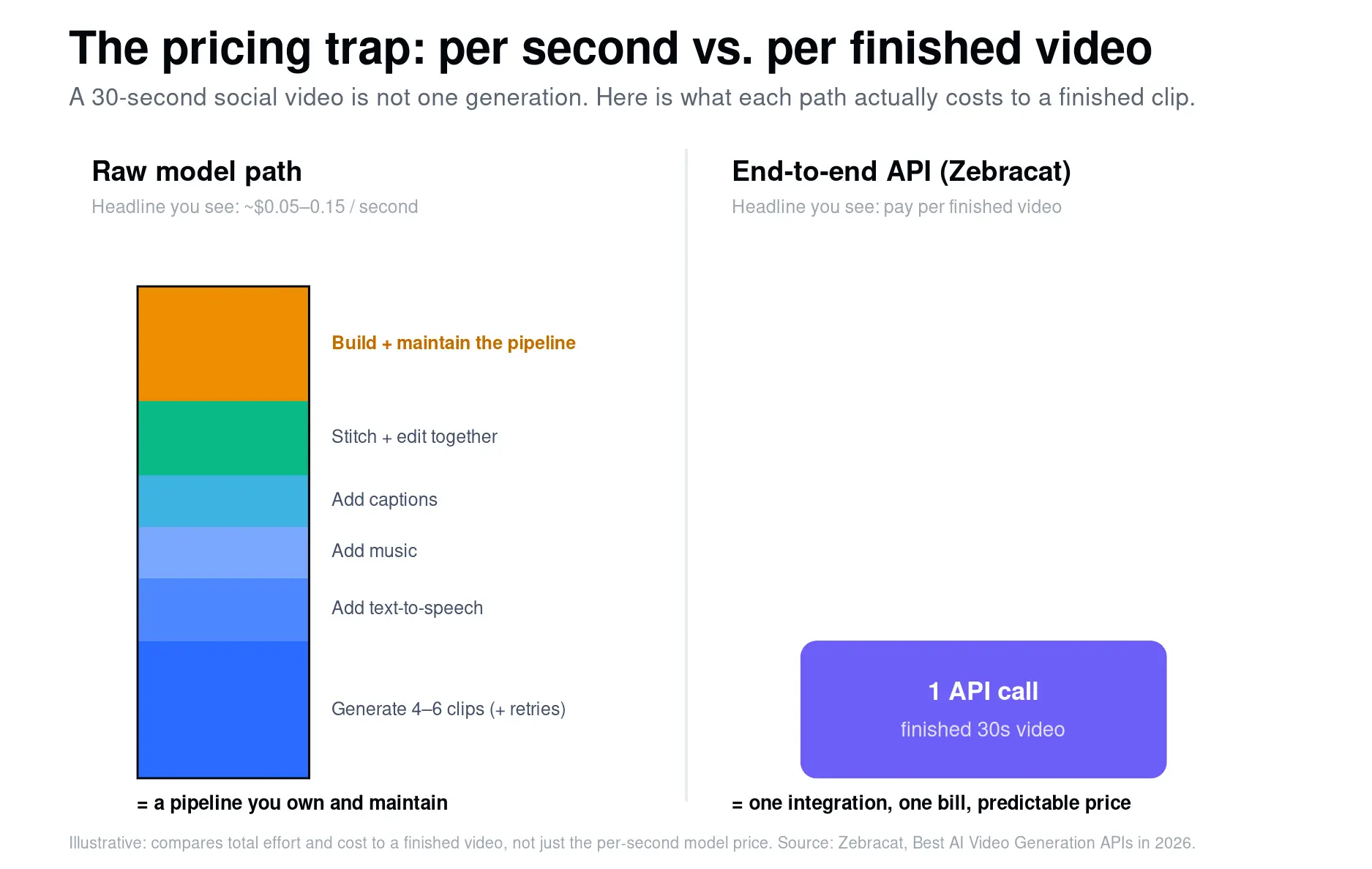
Headline per-second pricing makes raw models look cheap. It hides the real cost, because a per-second price buys a clip, not a finished video.
Take our test brief: one 30-second vertical social video with voiceover, music, and captions. Here's the honest math.
With a raw model (e.g., ~$0.05-0.15/sec): a 30-second video isn't one generation. Models produce ~5-8s clips, so you generate 4-6 clips (often several attempts each to get usable takes), then add a separate text-to-speech API, license or generate music, auto-caption, and stitch and edit everything together. The per-second model cost might be $2-6, but the real cost is the engineering time to build and maintain that pipeline, plus the TTS, captioning, and editing services bolted on. You're assembling a product, not buying a video.
With an avatar API: you get a presenter reading the script, but no scenes, B-roll, or dynamic editing, so it only fits if a talking head is the whole creative.
With an end-to-end API (Zebracat): one call returns the finished, captioned, music-scored, on-brand 30-second video. One integration, one bill, predictable per-video cost, no stitching.
The lesson: compare APIs on cost-to-deliverable, not cost-per-second. For raw creative shots, model APIs win. For finished videos at scale, an end-to-end API is almost always cheaper once you count the assembly you'd otherwise build and maintain.
Which AI video API should you choose? (decision framework)
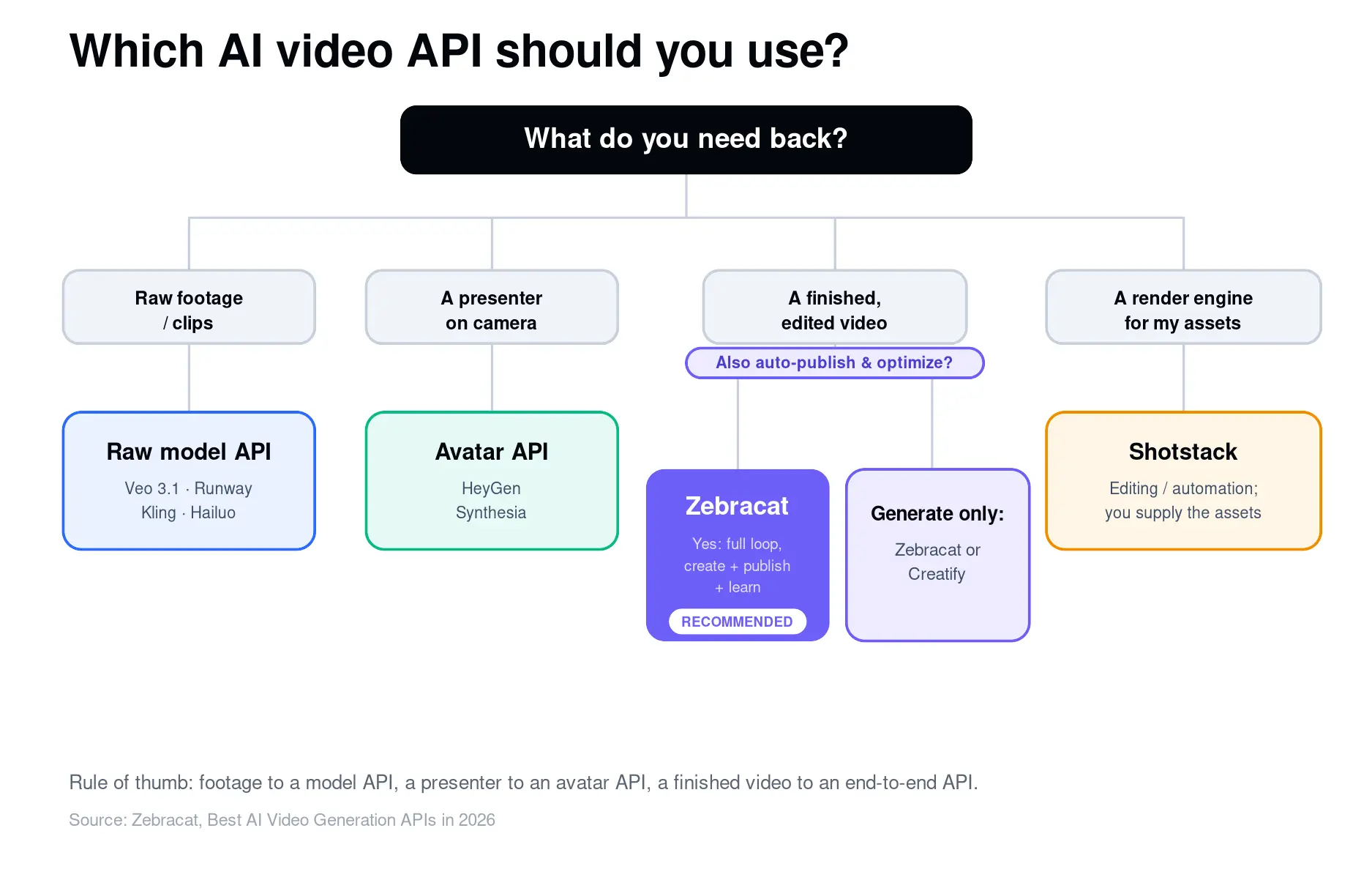
Answer four questions:
- What do you need back: footage, a presenter, or a finished video? Footage points to a raw model (Veo, Runway, Kling, Hailuo) or an aggregator (fal.ai). A presenter points to an avatar API (HeyGen, Synthesia). A finished video points to an end-to-end API (Zebracat; Creatify for avatar/UGC ads).
- Do you also need to publish and optimize, not just generate? Yes points to Zebracat (strategy, create, schedule, learn). Just rendering assets you supply points to Shotstack.
- What's your volume and cost sensitivity? High volume of finished videos favors an end-to-end API on cost-to-deliverable. High volume of raw clips favors Kling/Hailuo or self-hosted open models.
- Any compliance or data constraints? EU/GDPR or brand-governance needs point to Zebracat (EU-hosted, GDPR, CAI) or Synthesia (SOC 2) for enterprise avatar use.
Best AI video API by use case
- Marketing and social video at scale, URL-to-video: Zebracat
- UGC avatar ad variants: Creatify
- Spokesperson videos and localization: HeyGen
- Corporate training and internal comms: Synthesia
- Mass-personalized rendering from your data: Shotstack
- Creative and cinematic shots: Runway, Veo 3.1
- Cheap, fast raw clips at volume: Kling, MiniMax Hailuo
- Multi-model experimentation: fal.ai / Replicate
Frequently asked questions
What is an AI video generation API?
It's a service that creates video programmatically from inputs like text, a script, a URL, or an image. You send a request; the API returns a video file (or a job ID and a webhook when it's ready). Some return raw clips, some return talking avatars, and some, like Zebracat, return a finished, edited video.
How much does an AI video API cost?
It depends on the layer. Raw models charge per second (roughly $0.03-0.40/sec in 2026). End-to-end APIs charge per finished video; Zebracat is pay-as-you-go from $10 with no commitment. Avatar platforms charge monthly subscriptions with API access on higher tiers. Always compare cost-to-finished-video, not just per-second rates.
Is there a free AI video generation API?
Several offer free trials or limited free tiers (Zebracat, HeyGen, Runway, Kling). Open models like Wan and Hunyuan are free if you self-host, but you pay in GPU and engineering overhead.
Can I generate a complete video, not just a clip, from one API call?
Yes. That's the point of end-to-end creation APIs. Zebracat assembles script, visuals, voiceover, music, and captions into a finished MP4 from a single call to its /v1/generate endpoint, and can publish it for you too.
Which AI video API is best for developers building a product?
If the feature is "turn user text or URLs into finished videos," Zebracat (REST + MCP + webhooks + Zapier/Make/n8n) is the fastest path. If you need raw creative footage, use a model API or an aggregator like fal.ai. If you need a programmable render engine, use Shotstack.
Does Sora have a public API in 2026?
No. OpenAI deprecated the Sora API in early 2026 and announced its full discontinuation; the developer endpoints are no longer accessible. If you need comparable raw quality, Veo 3.1 is the closest alternative, followed by Runway and Kling. Confirm OpenAI's current status before relying on anything.
The bottom line
The "best" AI video API depends on what you need to ship. For raw creative footage, Veo 3.1 and Runway lead. For talking-avatar presenters, HeyGen and Synthesia. For a programmable render engine, Shotstack. But if your goal is the one most teams actually have, finished and on-brand videos, at scale, from text or a URL, ideally published and optimized automatically, Zebracat is the most complete option, because it's the only one that handles the entire job in a single call instead of leaving you to assemble a pipeline.
Build finished videos into your product in minutes. Get your Zebracat API key — pay-as-you-go from $10, no credit card required, first video in under five minutes.

Michael Baumgartner has been building AI video products since 2021 and runs several AI-first social channels with a combined 500K+ followers. He uses AI video generation APIs in production every day, from raw model endpoints to full end-to-end pipelines, and tested every tool in this guide hands-on.
Create videos 10x faster and easier with Zebracat
Try it now

Comments