


Table Of Content
The AI video market changed more in the last eight months than in the three years before it. OpenAI shut down the Sora app in April 2026. Google's Veo 3.1 now generates realistic clips with native audio. Kling produces human motion that passes a double take. Half the "best AI video generator" lists you'll find are already obsolete.
I create videos for a living, and I have tested more than 30 of these tools over the past two years, re-testing the major ones in June 2026 for this update. Same test every time: one script, one product demo idea, one faceless social clip, and I track how long it takes to get something I would actually publish.
One thing I learned fast: "AI video generator" now means two different things. Raw video models (Veo, Kling, Runway) generate stunning 5 to 10 second clips from a prompt. Finished-video tools (like Zebracat) turn a script or blog post into a complete video with voiceover, captions, music, and the right format for TikTok, Reels, or YouTube. Most disappointment with AI video comes from picking the wrong category for the job.
Here are the 11 tools that earned a spot in 2026, sorted by what each one is actually best at.

How I Tested These Tools
Every list claims testing. Few show their work, so here is mine. For this June 2026 update I re-ran the same three tasks through every tool on this list:
- The script test. The same 80-word product script, pasted into every tool that accepts text, timed from paste to first output I would actually publish.
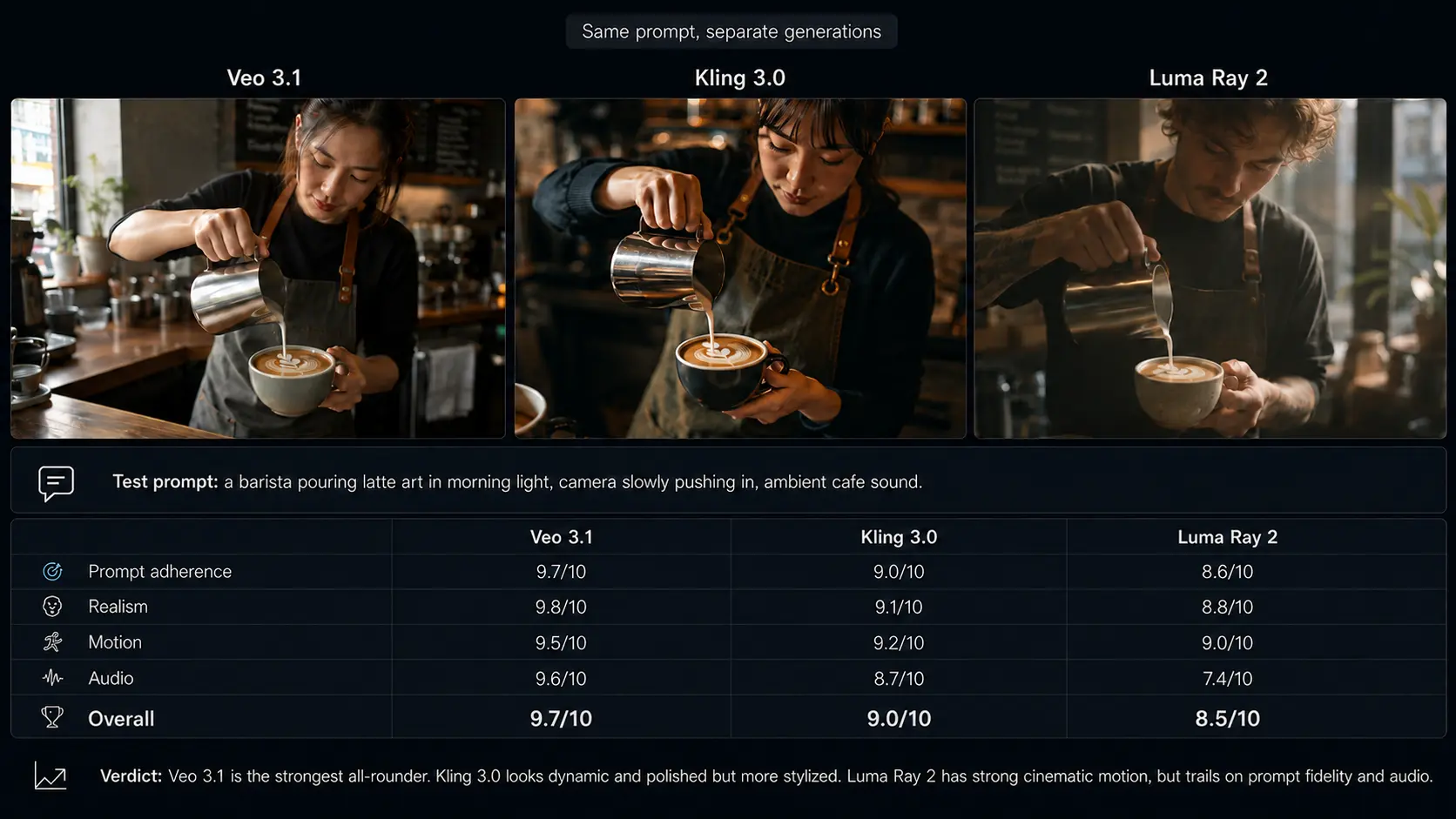
- The prompt test. One identical prompt for every raw model: "a barista pouring latte art in morning light, camera slowly pushing in, ambient cafe sound." Judged on realism, prompt adherence, and audio.
- The cost test. What one finished, publishable 30 to 45 second video actually costs on each tool's cheapest paid plan, counting failed generations against the bill.
The verdicts below reflect those runs, not vendor demo reels. Where a tool changed materially since my last full test in late 2025, I say so in its section. Here is how the three leading raw models scored on the identical prompt:
What Changed in AI Video in 2026
- Sora is gone for consumers. OpenAI discontinued the Sora app and web experience on April 26, 2026, and the API shuts down on September 24, 2026. If a list still recommends Sora, it was written before spring 2026.
- Native audio is the new baseline. Veo 3.1 generates synchronized sound and dialogue with video. Silent-clip models now feel dated.
- Realism stopped being the bottleneck. Kling and Seedance 2 produce photorealistic humans and physics. The bottleneck now is turning impressive clips into finished, publishable videos.
- Pricing split in two. Raw model credits get expensive fast (a single high-quality Veo clip can cost a dollar or more in credits), while finished-video tools charge flat monthly plans.
Best AI Video Generators 2026: Quick Comparison
| Tool | What it is | Pricing | Best for |
|---|---|---|---|
| Zebracat | Finished videos from text or blogs, with the latest generation models auto-selected per scene | Free plan; paid from $19/mo (annual) | Marketers, faceless creators, social teams |
| Google Veo 3.1 | Raw video model with native audio (via Gemini/Flow) | From $19.99/mo (Google AI Pro) | Realistic short clips, ads, b-roll |
| Kling 3.0 | Raw video model, photorealistic humans and motion | Free daily credits; paid from $6.99/mo | Realistic characters on a budget |
| Runway | Pro creative suite around the Gen-4 model | Paid plans from $15/mo | Filmmakers, VFX, creative pros |
| Synthesia | AI avatar presenter videos | From ~$29/mo | Corporate training, L&D |
| HeyGen | AI avatars, video translation, personalized outreach | Free (3 videos/mo); from $29/mo | Avatar marketing videos, localization |
| Luma Dream Machine | Fast raw video model (Ray 2) | Free tier; paid from $23.99/mo | Quick ideation, social experiments |
| Fliki | Voiceover-first text-to-video | Free plan; paid from ~$8/mo (annual) | Narrated videos, podcasters |
| InVideo AI | Prompt-to-video with templates and stock | Free plan; paid from ~$20/mo (annual) | Template-based social videos |
| CapCut | Free editor with AI features | Free; Pro around $10/mo | TikTok creators, manual editing |
| Seedance 2 | Frontier raw model, best-in-class motion | Limited access | Early adopters, cutting-edge clips |
The 11 Best AI Video Generators in 2026, Tested
1. Zebracat: Best for Marketers and Faceless Creators Who Need Finished Videos
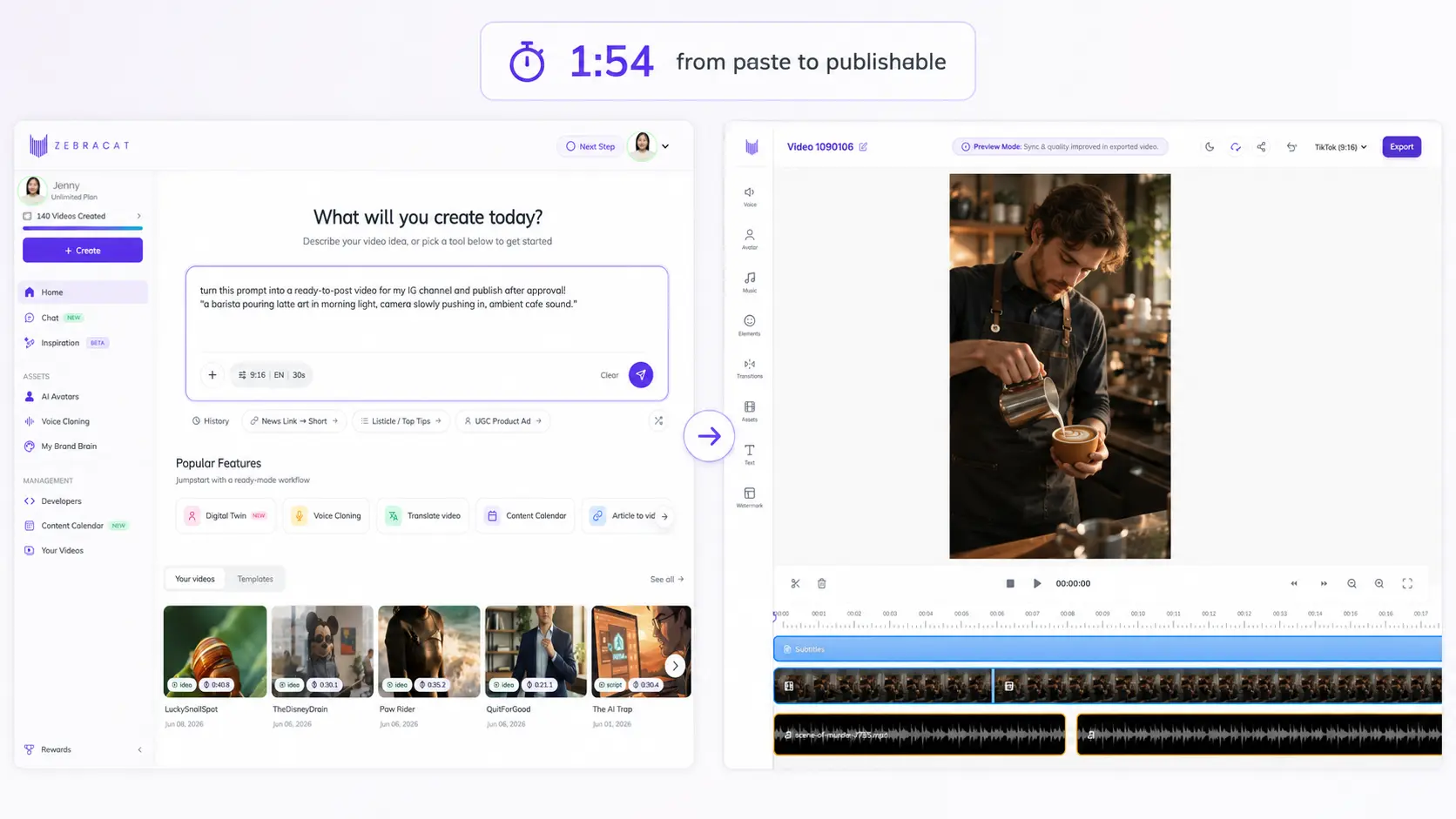
Zebracat is the tool I reach for when the goal is a publishable video, not a clip. You paste a script, a rough idea, or a blog URL, and it returns a complete video: AI visuals, human-sounding voiceover, captions, music, and the right aspect ratio for the platform. In my testing, Zebracat turned the same barista prompt from the raw-model test above into a ready-to-post 30-second vertical video, captions, voiceover, and music included, in 1 minute 54 seconds. The only edit I made was swapping one scene.
Here is what changed in 2026: Zebracat now gives you the latest video generation models in one place, the same class of engines reviewed below. Its orchestration layer understands which model handles humans, products, or motion best, and picks the right one for each scene automatically. You get frontier visuals without juggling three subscriptions, three credit systems, and a mental map of which model fails at hands.
The newest addition is Zebracat's video generation agent, and it reframes what a tool like this is for. The agent supports the entire process: it helps create the video, schedules it, posts it to your social channels, and learns from what performs to improve the next batch. For Zebracat, video generation is no longer about the video. It is about social media growth you can measure.
Honest limitation: if your work is single cinematic shots with frame-level directorial control, a dedicated raw-model workflow in Runway or Flow gives you finer control. If you need 15 finished TikToks this week, published, scheduled, and learning from each other, nothing on this list comes close.
Key features
- Text to video and blog to video in one click
- The latest video generation models in one place, auto-selected per scene by Zebracat's orchestration engine
- AI video agent that creates, schedules, posts to social, and learns from performance
- AI scene generation in 20+ visual styles
- 120+ human-sounding AI voices, plus voice cloning
- Auto captions, music, and 9:16, 1:1, 16:9 formats
Pricing
Free plan with watermark. Paid plans from $19/month billed annually ($39 month to month). Full details on the pricing page.
Best for
Marketers, social media teams, and faceless channel operators who measure output in published videos per week, and growth in followers, not renders. Rated 4.8/5 on G2.
2. Google Veo 3.1: Best Raw Video Model Overall
Veo 3.1 is the most complete raw model on the market right now. It generates video with synchronized native audio, follows prompts with unusual precision, and handles physics, lighting, and camera movement convincingly. On my latte-art prompt it was the only model that got the milk physics, the slow push-in, and believable cafe ambience in a single take. Nothing else managed all three.
You access it through the Gemini app or Google's Flow filmmaking tool. The catch is credits: Google AI Pro at $19.99/month includes 1,000 Flow credits, which sounds generous until you learn a top-quality Veo generation can burn around 100 of them. In my cost test that worked out to roughly ten great clips a month on the base plan. The $249.99 Ultra plan exists for a reason.
Pricing
Google AI Pro from $19.99/month (about 10 quality generations); Ultra at $249.99/month. API access is priced per second.
Best for
Ad creatives, b-roll, and realistic short clips where quality per clip matters more than volume.
3. Kling 3.0: Best Photorealistic Humans on a Budget
Kling built its reputation on one thing: people who look real. Faces, hand movement, fabric, walking. In my testing the latest Kling 3.0 beat everything except Veo on human realism, and it costs a fraction of the price. The barista in my test prompt had convincing hands, which remains the tell that separates the top models from the rest.
Trade-offs: my free-tier renders queued for 15 to 30 minutes (paid queues were minutes), and prompt adherence is a step behind Veo. It dropped my camera push-in on two of three attempts. But for character-driven clips on a budget, nothing touches it.
Pricing
Free daily credits with watermark. Paid plans from $6.99/month.
Best for
Creators who need realistic human characters without enterprise budgets.
4. Runway: Best for Filmmakers and Creative Professionals

Runway is no longer just a model, it is a full creative environment built around Gen-4. Motion brush, camera controls, style references, and editing tools that treat AI generation as one step in a real production pipeline. Filmmakers and VFX artists live here.
The learning curve is real. My first hour in Runway was the least productive hour of this entire test. By hour three, using the motion brush and camera controls, it produced a version of my latte-art shot with framing I could not get from any prompt-only model. Higher tiers include an unlimited generation mode, which matters for iteration-heavy work.
Pricing
Free trial credits. Paid plans from $15/month; unlimited generation on top tiers.
Best for
Professionals who want directorial control and will invest time to learn the toolset.
5. Synthesia: Best for Corporate Training Videos
Synthesia owns the avatar-presenter category. Pick an avatar, paste a script, and you get a training or onboarding video in 140+ languages with studio-level consistency. My 80-word script became a presenter video in about six minutes, and the avatar's pacing needed zero correction. Enterprises use it to replace filming entirely. I keep a full Synthesia review updated separately.
It is not built for social content or creative storytelling. Avatars present; they do not perform. Costs also scale with video minutes, and custom avatars are a four-figure annual add-on.
Pricing
From about $29/month (cheaper billed annually); video-minute limits per tier.
Best for
L&D and internal comms teams producing training content at scale.
6. HeyGen: Best for Avatar Marketing and Video Translation

HeyGen takes the avatar concept where Synthesia does not: marketing. Building my instant avatar took one webcam clip and about ten minutes, and the result was good enough that a colleague asked when I had filmed it. You can generate spokesperson videos at scale and translate existing videos into 170+ languages with cloned voice and adjusted lip sync. The translation feature alone justifies the subscription for international teams.
Lip sync still drifts on complex scripts, and the avatar uncanny valley shows up in close-ups. For talking-head marketing volume, it is the best in class.
Pricing
Free plan with 3 videos/month. Creator from $29/month.
Best for
Personalized outreach, UGC-style ads, and localizing video libraries.
7. Luma Dream Machine: Best for Fast Ideation
Luma's Ray 2 model is the one I use to think. My latte-art prompt came back in under a minute; it missed the slow push-in but nailed the mood and lighting. Quality sits a tier below Veo and Kling, but speed changes how you work: I iterated ten concepts in the time Veo rendered two.
Pricing
Free tier (720p, watermark, limited daily generations). Paid plans from $23.99/month.
Best for
Concept testing, social experiments, and quick creative drafts.
8. Fliki: Best for Voiceover-First Content

Fliki approaches video from the audio side. Its 2,000+ voices in 80+ languages are the draw, and the video layer assembles stock visuals around your narration. My script became a narrated video in about four minutes; I swapped two mismatched stock clips before it was usable. The text-based editor feels like writing a document, which makes it the gentlest learning curve on this list.
Visual-voice matching still misses sometimes, and the stock-footage look is recognizable. For narrated explainers and audio-led content, it remains a solid budget pick.
Pricing
Free plan with watermark. Paid plans from around $8/month billed annually.
Best for
Podcasters and creators whose content starts with a script and a voice.
9. InVideo AI: Best for Template-Based Social Videos
InVideo generates complete videos from a prompt using templates, stock libraries, and AI voiceover. It is closest to Zebracat in concept, with a heavier lean on stock footage and templates versus generated visuals. In my script test the first draft took about five minutes, then another ten of swapping template-y stock shots. I compared them head to head in my InVideo review.
Generation credits run out faster than you expect on lower tiers, and heavy template reliance shows in the output. Still a capable prompt-to-video workhorse with a large user base.
Pricing
Free plan available. Paid plans from about $20/month billed annually.
Best for
Social media managers comfortable with a stock-and-template look.
10. CapCut: Best Free Option for Short-Form Editing

CapCut is not a video generator in the 2026 sense, it is the best free editor with AI features bolted on: auto-captions, smart cropping, long-to-short conversion, text to speech. If your workflow is filming content and editing it for TikTok, CapCut is still the default. Its auto-captions on my test clip needed three corrections in 45 seconds of speech, which beats every other free captioning tool I have tried.
Know the boundary: it will not create videos from a script. Pair it with a generator from this list and it becomes the finishing layer.
Pricing
Free for core features. Pro around $10/month.
Best for
TikTok and Shorts creators editing filmed or generated footage.
11. Seedance 2: The One to Watch
ByteDance's Seedance 2 produces the most impressive motion and camera intelligence I have seen from any model, and early testers consistently rank it at or above Veo on realism. I could not run my full test suite on it because access is still limited and there is no reliable free path, which keeps it at the bottom of this list for now. If general access opens later in 2026, expect it to move up fast.
Pricing
Limited access; pricing not broadly available yet.
Best for
Early adopters who want frontier output quality and can live with access hurdles.
12 More Tools I Tested That Didn't Make the Cut
These are not bad tools. They lost their spots to stronger picks in the same category:
- Pika: fun, fast, affordable raw clips; output quality now sits a clear tier below Kling at a similar price.
- Hailuo (MiniMax): strong motion and a generous free tier; watermarks and commercial-use limits hold it back.
- Pictory: decent blog-to-video, but slower and more stock-dependent than Zebracat in my runs. My full Pictory test goes deeper.
- Veed.io: capable online editor; its AI generation lags the leaders. See the best Veed alternatives.
- Kapwing: great collaborative editing, weak generation.
- Elai.io: workable avatar platform; Synthesia and HeyGen beat it on avatar quality and language support.
- DeepBrain AI: realistic avatars, rigid editing experience.
- Steve.ai: animation niche, but the output styles feel dated in 2026.
- FlexClip: fine template editor; the AI layer is thin.
- Descript: excellent text-based editing of recorded video, but it is not a generator.
- Lumen5: the original blog-to-video pioneer, with little meaningful AI progress since.
- Animoto: slideshow-style output that predates the current AI generation wave.
How to Choose: Raw Model or Finished-Video Tool
Ask one question: what lands in your content calendar, clips or videos?
- You need publishable videos at volume (social content, ads, faceless channels): pick a finished-video tool. Zebracat if you want generated visuals, model orchestration, and speed; InVideo if you prefer stock and templates.
- You need individual high-impact shots (ad hero clips, film work, b-roll): pick a raw model. Veo 3.1 for overall quality with audio, Kling 3.0 for realistic humans on a budget, Runway for directorial control.
- You need a person on screen without filming: Synthesia for training, HeyGen for marketing and translation.
- You need scale across both: generate clips in a raw model and finish in CapCut, or let Zebracat's orchestration engine run both steps in one tool, then hand scheduling and posting to its agent. This is how most serious teams operate in 2026.
FAQs
Is Sora 2 still available in 2026?
No. OpenAI discontinued the Sora app and web experience on April 26, 2026, and the API shuts down on September 24, 2026. Veo 3.1, Kling, and Runway are the closest replacements for raw generation; Zebracat is the alternative if you wanted Sora for finished social videos.
What is the best free AI video generator?
For complete videos, Zebracat's free plan creates videos from text with a watermark. For raw clips, Kling's free daily credits are the most generous. CapCut is the best fully free editor.
What is the difference between a raw video model and an AI video tool?
A raw model (Veo, Kling, Seedance) turns a prompt into a short clip, usually 5 to 10 seconds, with no captions, voiceover, or platform formatting. A finished-video tool (Zebracat, InVideo) outputs a complete, publish-ready video from a script or article. Most teams need the second and only sometimes the first. Zebracat blurs the line by running the latest generation models inside its finished-video workflow and choosing the best one per scene.
Which AI video generator is best for marketing videos?
Zebracat for fast, finished social and ad videos from text, with scheduling and posting handled by its agent. HeyGen if your marketing depends on a talking-head presenter. Veo 3.1 if you need a single premium hero clip for a campaign.
Which AI video generator is the most realistic?
Veo 3.1 leads overall thanks to native audio and prompt accuracy. Kling 3.0 comes close on human realism at a lower price. Seedance 2 may top both once access opens up.
The Bottom Line
The 2026 stack is simple. One raw model for impact shots: Veo 3.1 if budget allows, Kling 3.0 if it does not. One finished-video tool for volume: that is where Zebracat earns its keep, and since it now bundles the latest generation models and picks the right one per scene, many teams skip the separate model subscription entirely. Its agent then schedules, posts, and learns from what performs, because the goal was never the video. It is the growth.
Every tool here has a free tier or trial except Synthesia and Seedance. Test with your own script, not a demo prompt. The right tool is the one that gets your specific content published, and your account growing, faster.

Hey there, I’m Jenny. I’ve been in marketing for almost 10 years, and I love marketing tech, AI, and automation. I’ve built several YouTube and TikTok channels—some hits, some misses. I joined Zebracat after being a user myself, ready to share my learnings with the world!
Create videos 10x faster and easier with Zebracat
Try it now
Comments