



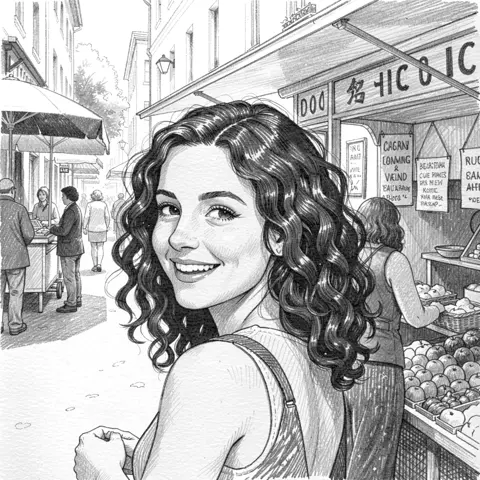
Crayon stays crayon
Wobbly lines, paper texture and the exact colours are kept. Nobody redraws it into a polished cartoon. It just starts to move.
- Pencil and crayon
- Marker and watercolour
- Digital sketches
 Capterra 4.9
 G2 4.8
 Trustpilot 4.7
Bring a sketch, a doodle or a child's drawing to life. Upload a photo of it, describe the motion, and its lines and colours stay as you drew them.
Your first video is free. Sign up on the next step and get your video in minutes.
Three steps
Name the parts of the drawing that come alive: the dragon's wings, the girl's ponytail, the sun in the corner.
Take a photo or scan of the page and add it here. Sign up when the studio opens: your drawing and your words are already in the chat.
Check the plan, generate, and download the clip to show the artist.
What you get
Wobbly lines, paper texture and the exact colours are kept. Nobody redraws it into a polished cartoon. It just starts to move.
Say which character moves and how. "The cat chases its tail twice" gives a clearer result than "make it move".
Kids go quiet when their own drawing starts to move. Fridge art and birthday cards both work.
Who it is for
They photograph her rainbow unicorn, type "the unicorn gallops across the rainbow and waves", and watch it gallop the same evening.
He attaches one ink panel and asks for the hero's cape to flutter and the city lights to flicker, for an Instagram teaser.
She animates five pupils' self-portraits blinking and smiling for the end-of-term assembly slideshow.
She brings a pencil concept of a robot vacuum to life, rolling across the page, to pitch the idea in a meeting.
Comparison
Good to know
Lay the page flat in daylight, shoot from straight above, and fill the frame with the drawing. Avoid shadows from your phone and glare on glossy paper. A flatbed scan is even better. If the drawing sits on lined paper, that texture will move with it, which is often part of the charm.
Name the subject and the action: "the dog wags its tail", "the boat rocks on the waves". Add what should stay still if it matters. Two or three motions are plenty for a short clip. Give it a long list of actions and they tend to blur together.
A dragon that flaps its wings over a castle. A family that waves from the front door. A crayon rocket that lifts off the fridge. A dog that chases its tail twice. Give each character one action, keep the outline clear and the colours bold, and let the background stay still. Birthday cards, comic panels and notebook doodles all work.
Reviews
★★★★★
”The variety—from photo-realistic to stop-motion—is perfect for my channel and better suited to my needs than other tools I've tried. I visit the site often and consistently get the results I want.”
 Kelly Content creator, small-business owner · Reviewed on G2
★★★★★
“I’ve been using it for 3 weeks, testing 3-4 videos per day. This saves a lot of time, gets results, and costs way less than hiring creators.”
 Yasemin F. Social Media Marketer · Reviewed on Capterra
★★★★★
“I know (and used) a lot of AI video tools (for different usecases). Also direct competitors. Zebracat is the only one that gives great results very fast - also the caption styles are great!”
 Robert Leitinger CodeRocker - Online Marketing Agency · Reviewed on G2
FAQ
Upload a photo of the drawing, describe the motion and press Open in the studio. After a free sign-up the drawing and your words are already in the chat, so you just send. You'll see the plan before anything is generated.
Zebracat keeps the lines, colours and hand-drawn look. If something drifts, say in your text what to keep, and check the plan before you generate.
It's one of the best uses. Bold shapes and clear outlines animate well.
Pick one panel at a time. A single scene with one or two characters gives the cleanest motion.
It still works. Crop out notebook edges before uploading if you want only the drawing.
Right here on this page, in the box next to the description. It stays attached through sign-up and arrives in the studio with your words.
Planning is free, and your first video is free. After that, videos use your plan's allowance.
Keep going
 Image Animator New Bring a still photo to life with gentle motion.
 Anime Video Maker Turn a story into an anime-style narrated video.
 Cartoon Video Maker Bright 2D cartoon videos from your script.
 Ken Burns Effect Video Maker New Slow pans and zooms over your photos, with music.
 AI Animation Generator New Cartoon, anime or 3D animation from one idea.
Go further
Give a single picture motion and use it as a scene in your video.
Make the scenes you cannot film, from a short description.
Write a few lines and get a Reel back with a voice and captions on it.
Find the plan that fits how much video you make.