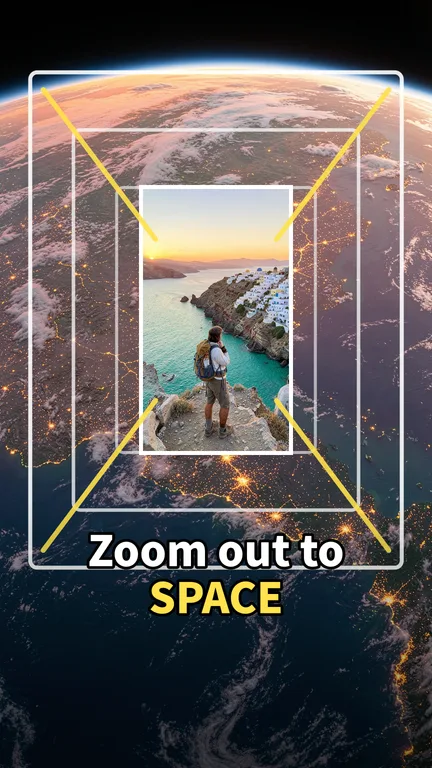
Ground to orbit in one move
The camera starts on your photo and rises over the rooftops. Then the region, then the clouds, then the planet.
- Street level
- City and region
- Whole Earth
 Capterra 4.9
 G2 4.8
 Trustpilot 4.7
Start on the place in your photo and pull back past the city and the clouds until the whole Earth is in view. Describe it, add your photo in the next step, and get the zoom in minutes.
Your first video is free. Sign up on the next step and get your video in minutes.
Three steps
Town, city and country, so the view from above shows the right coast or skyline.
The studio opens with the place name typed in. Sign up, attach the photo with the paperclip and send.
Approve the plan, generate, and post the pull-back.
What you get
The camera starts on your photo and rises over the rooftops. Then the region, then the clouds, then the planet.
Name the location and the studio can plan a coastline or skyline that fits where you were.
People use the "zoom out to space" clip for travel posts and "where I am right now" videos.
Who it is for
He attaches a photo on a beach in Lisbon and asks to rise until Portugal and then the Earth are visible.
They pull back from their terrace photo to the whole mountain range for an ad.
She starts on the school playground and rises to show the country's place on the globe.
They pull back from the proposal photo in Paris for their announcement.
Comparison
Good to know
It goes from a person to a planet in a few seconds. That makes it a good reveal of a location or of how far someone travelled. Sometimes it just shows how small one moment is.
An outdoor photo with some sky works best, since the camera rises upward. Indoor photos make the first move harder. A landmark in the shot helps the studio match the view from above.
A wedding photo that pulls back to the whole coastline. A new shop front that rises to the city map. A travel selfie that zooms out to the full continent. A school photo for a graduation video that ends on the whole planet. Name the place in your text so the zoom flies over the right part of the world.
Reviews
★★★★★
”The variety—from photo-realistic to stop-motion—is perfect for my channel and better suited to my needs than other tools I've tried. I visit the site often and consistently get the results I want.”
 Kelly Content creator, small-business owner · Reviewed on G2
★★★★★
“I’ve been using it for 3 weeks, testing 3-4 videos per day. This saves a lot of time, gets results, and costs way less than hiring creators.”
 Yasemin F. Social Media Marketer · Reviewed on Capterra
★★★★★
“I know (and used) a lot of AI video tools (for different usecases). Also direct competitors. Zebracat is the only one that gives great results very fast - also the caption styles are great!”
 Robert Leitinger CodeRocker - Online Marketing Agency · Reviewed on G2
FAQ
A clip that starts on a photo and pulls back, higher and higher, until the whole Earth is in view.
Name the place, open the studio, attach your photo and send. The plan shows the move before you generate.
It's generated from your photo and the place name. The view is believable, but it isn't a satellite map.
Outdoor photos with sky work much better.
Ask for the reverse in the box: start in space and end on your photo.
The studio takes it after sign-up. Look for the paperclip.
Free to plan. Generating uses your plan's allowance.
Keep going
 Crash Zoom Video Maker New A fast, punchy zoom into the subject of your photo.
 Dolly Zoom Video Generator New The vertigo shot: the background stretches, the subject stays.
 Travel Video Maker Places, one per scene, narrated like a travel show.
 Ken Burns Effect Video Maker New Slow pans and zooms over your photos, with music.
 Image Animator New Bring a still photo to life with gentle motion.
Go further
Start from your own pictures and animate them into short clips.
Make the scenes you cannot film, from a short description.
Vertical videos sized for Instagram and ready to post.
Find the plan that fits how much video you make.